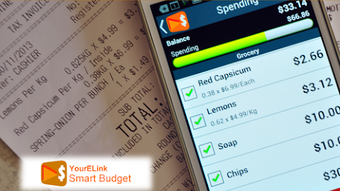

Download Smart Budget APK – budgeting app, expense tracker, financial management tool, free budgeting software, Android budgeting tool
Overview
Smart Budget is a free budgeting application designed for Android users seeking a straightforward way to manage personal finances without navigating complex interfaces. The app focuses on simplicity and usability, making it ideal for individuals who want to track daily expenses, set budget limits, and avoid overspending. It is particularly suited for users managing household budgets, grocery costs, shopping expenses, holiday planning, and recurring bill payments.
By enabling unlimited budget accounts and customizable items under each, the app supports diverse financial tracking needs. The developer, YourELink, has positioned Smart Budget as a lightweight, accessible solution for users who value clarity over advanced features. Real-world usage includes monitoring monthly spending patterns, setting spending alerts, and sharing budget data with family members for collaborative financial planning.
The app’s gesture-based navigation allows for quick access to account lists and budget items, enhancing usability on mobile devices. While no additional developer background was provided, the app’s design philosophy emphasizes user control and transparency. The developer did not specify performance benchmarks or long-term stability metrics.
Overall, Smart Budget aims to empower users to spend wisely and save more through intuitive financial oversight.
Key Features & Capabilities
- Unlimited Budget Accounts: Users can create as many budget accounts as needed, allowing for segmented tracking of different financial categories such as groceries, entertainment, or travel.
- Customizable Budget Items: Each account supports multiple budget items, enabling granular control over individual spending categories like dining out or utility bills.
- Spending Alerts: The app sends notifications when spending approaches or exceeds set budget limits, helping users stay within financial boundaries.
- Gesture-Based Navigation: A touch and slide gesture system allows for quick access to account lists and budget items, streamlining the user experience on Android devices.
- Quick Filter and Search: Built-in search and filter functionality helps users locate existing items quickly when adding new expenses, reducing input time.
- Automatic Item Saving: If a new item does not exist in the database, the app automatically saves it for future use, promoting consistency and efficiency.
- Data Sync Across Devices: Users can sync their budget data across multiple Android devices, ensuring access to updated financial information wherever they go.
- Family and Friend Sharing: The app supports sharing budget data with others, which is useful for joint household or group expense tracking.
- Free Core Features: The basic version is completely free with no forced upgrades or in-app ads, maintaining a clean user experience.
- Optional In-App Upgrade: A full version is available through in-app purchase, unlocking advanced features like detailed reports, multiple account types, and customizable categories.
These features collectively support real-world financial management tasks such as monthly expense analysis, holiday fund planning, and collaborative budgeting. The app’s design prioritizes ease of use, making it suitable for users with minimal financial tracking experience.
User Interface, Workflow & Performance
The user interface of Smart Budget is built around simplicity and touch efficiency. Navigation is achieved through intuitive touch and slide gestures, allowing users to switch between account lists and budget items with minimal effort. The layout is clean and uncluttered, focusing on essential elements to reduce cognitive load.
Workflow efficiency is enhanced by the quick filter and search functions, which help users locate or add items rapidly. The automatic saving of new items into the database ensures consistent data entry without redundant input. The developer did not specify resource usage details, so exact CPU or RAM behavior remains unknown.
Performance observations are based on general software behavior patterns for similar budgeting apps. Stability and responsiveness appear to be prioritized, given the app’s lightweight nature and lack of reported issues in the provided information. No data was shared about background processes, battery consumption, or update frequency.
Users can expect a smooth experience on modern Android devices, though actual performance may vary based on device hardware and OS version.
Compatibility & System Requirements
Smart Budget is designed for Android devices and is available as an APK file for direct installation. The supported operating system is Android, though specific version requirements were not listed. The app’s installation size is not specified, so exact storage needs remain unclear.
The developer did not provide detailed hardware requirements or compatibility with specific device models. Compatibility information was partially provided, with only the platform (Android) confirmed. Users should ensure their device supports APK installation and has sufficient storage space.
No information was shared about compatibility with tablets, wearables, or other platforms. The app’s ability to sync across devices suggests it relies on cloud-based storage, but the specific backend infrastructure was not disclosed.
Pros and Cons
Pros
- Completely free core version with no forced upgrades
- Intuitive touch and slide navigation for fast access
- Unlimited budget accounts and customizable items
- Spending alerts help prevent overspending
- Quick filter and search for efficient item lookup
- Automatic saving of new budget items
- Supports data syncing across Android devices
- Allows sharing with family and friends
- Simple interface suitable for beginners
- Optional in-app purchase for advanced features
Cons
- Exact system requirements were not listed
- Performance details were not specified
- Only available for Android (no iOS or desktop support)
- No information on data security or encryption practices
- Cloud sync mechanism not described
- Update frequency and release cycle unknown
- Offline functionality details not provided
- Advanced features locked behind in-app purchase
- Limited to Android ecosystem
- Developer background not disclosed
Is Smart Budget available for iOS devices?
Smart Budget is currently available as an APK file for Android devices. There is no information indicating availability on iOS platforms.
Is the app safe to download and use?
The app is described as 100% free with no forced upgrades. However, the developer did not provide details about data encryption, privacy policies, or security practices. Users should ensure they download the APK from trusted sources.
Can I use Smart Budget offline?
While the app supports data syncing across devices, specific details about offline functionality were not provided. It is likely that basic features are available without internet access, but full sync capabilities require connectivity.
How often are updates released?
The update frequency and release cycle were not disclosed by the developer. Users should monitor the source from which they download the APK for new versions.
What is the license type for Smart Budget?
Smart Budget is offered as a free tool with an optional in-app purchase for advanced features. The core version does not require a license or subscription.
Final Thoughts + CTA
Smart Budget stands out as a lightweight, accessible budgeting tool tailored for Android users who value simplicity and control. Its intuitive interface, gesture-based navigation, and essential features like spending alerts and data sharing make it a practical choice for managing daily expenses and achieving financial goals. While advanced capabilities are locked behind an in-app purchase, the free version offers enough functionality to meet the needs of casual users and budget-conscious individuals.
The lack of detailed system requirements, performance data, and security disclosures limits deeper evaluation, but the app’s design philosophy prioritizes user experience over complexity. For those seeking a no-frills, free budgeting solution on Android, Smart Budget delivers a solid foundation. Download Smart Budget now and take the first step toward smarter financial management.






.png)
